# Watchlist

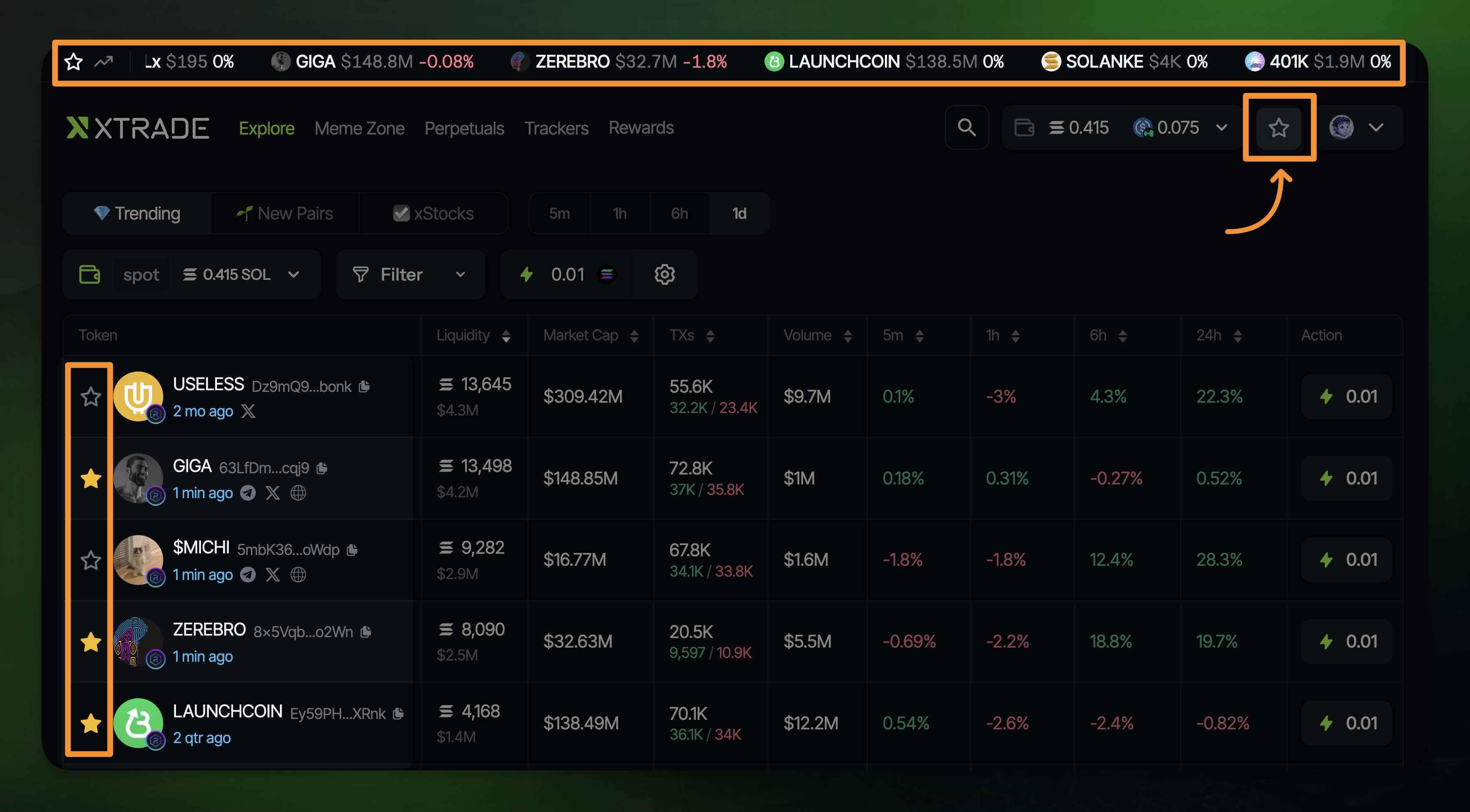
Your Watchlist lets you save favorite tokens so they’re easier to find later. Just tap the ⭐ next to any token on the **Explore** page, or when you open a token page.

<figure><img src="https://1042233579-files.gitbook.io/~/files/v0/b/gitbook-x-prod.appspot.com/o/spaces%2FsfHpAypmuxNMeLyuA77Q%2Fuploads%2FYv34F10S6c01GWIXeZhr%2Fwatchlist.png?alt=media&#x26;token=a24356b3-e011-4a0b-b783-f8956355d280" alt=""><figcaption></figcaption></figure>

## **Why use it?**

* <mark style="color:$info;">Quickly access starred tokens from the Watchlist ticker bar at the top</mark>
* <mark style="color:$info;">Open their trading panel instantly</mark>
* <mark style="color:$info;">Use Quick Buy right from your Watchlist</mark>
* <mark style="color:$info;">View</mark> <mark style="color:$info;"></mark><mark style="color:$info;">**liquidity**</mark><mark style="color:$info;">,</mark> <mark style="color:$info;"></mark><mark style="color:$info;">**market cap**</mark><mark style="color:$info;">,</mark> <mark style="color:$info;"></mark><mark style="color:$info;">**1h volume**</mark><mark style="color:$info;">, and</mark> <mark style="color:$info;"></mark><mark style="color:$info;">**1h transaction count**</mark> <mark style="color:$info;"></mark><mark style="color:$info;">at a glance</mark>
* <mark style="color:$info;">**Bonus:**</mark> <mark style="color:$info;"></mark><mark style="color:$info;">The ticker bar also shows your open spot positions for easy tracking</mark>

<figure><img src="https://1042233579-files.gitbook.io/~/files/v0/b/gitbook-x-prod.appspot.com/o/spaces%2FsfHpAypmuxNMeLyuA77Q%2Fuploads%2FQNWcy45Q6Q0KmvEoAYwe%2Fqbuywatch.png?alt=media&#x26;token=dce1b1e1-de24-41a7-b165-6b0192ec61d3" alt=""><figcaption><p>Access quick buy right from your Watchlist</p></figcaption></figure>