> For the complete documentation index, see [llms.txt](https://xtrade.gitbook.io/docs/llms.txt). Markdown versions of documentation pages are available by appending `.md` to page URLs; this page is available as [Markdown](https://xtrade.gitbook.io/docs/features-and-tools/meme-zone.md).

# Meme Zone

**Meme Zone** is where you can explore the freshest meme tokens, straight from their launch on protocols like **Pump.fun** before they hit other markets. It’s the perfect place for traders eager to spot new trends and jump in early on potential breakout tokens.&#x20;

### <a href="https://xtrade.xyz/meme-zone" class="button primary" data-icon="dove">Take My SOL</a>

## <mark style="color:green;">**New Creations**</mark> <a href="#a18i2blolwp" id="a18i2blolwp"></a>

<mark style="color:$info;">These are the newest meme tokens just launched and starting to gain interest. At this stage, tokens are sold through a special pricing model called a</mark> <mark style="color:$info;"></mark><mark style="color:$info;">**bonding curve**</mark><mark style="color:$info;">, where the price increases as more people buy. This is where the fun begins!</mark>

<figure><img src="/files/vTVDX9Om6IF1rOs7T96O" alt=""><figcaption></figcaption></figure>

## <mark style="color:green;">**Graduating Soon**</mark> <a href="#id-34b1724d7lw" id="id-34b1724d7lw"></a>

<mark style="color:$info;">Tokens here are nearing 100% completion of their bonding curve and are getting close to moving to larger trading platforms.</mark>

<figure><img src="/files/3dVApYsn8qKNz8uxFA0N" alt=""><figcaption></figcaption></figure>

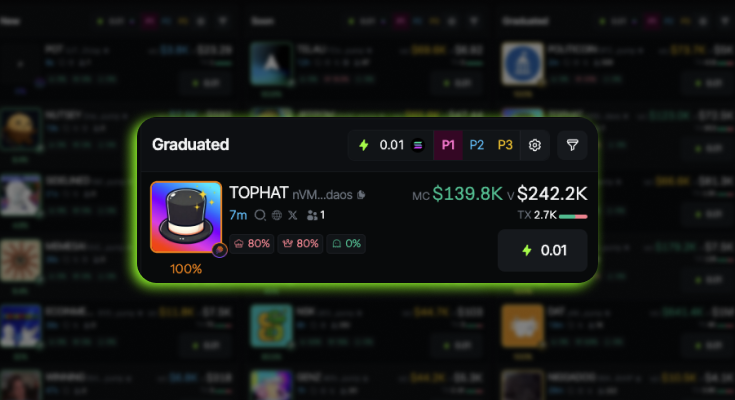
## <mark style="color:green;">**Graduated**</mark> <a href="#id-0kzt4ts0mpl" id="id-0kzt4ts0mpl"></a>

<mark style="color:$info;">Once the bonding curve hits 100%, these tokens graduate or migrate to Raydium, a popular decentralized exchange on Solana. This gives them better access for trading and more liquid markets.</mark>

<figure><img src="/files/V5jiZfZe4lNzktliNtqx" alt=""><figcaption></figcaption></figure>

***

### <mark style="color:orange;">Filters</mark> <a href="#eek47y5xz8e" id="eek47y5xz8e"></a>

To help you explore, Meme Zone lets you filter tokens. Use these to quickly spot what’s interesting to you:

* <mark style="color:$info;">Top 10 Holders</mark>
* <mark style="color:$info;">Mint Authority Disabled</mark>
* <mark style="color:$info;">Freeze Authority Disabled</mark>
* <mark style="color:$info;">Current Liquidity</mark>
* <mark style="color:$info;">Volume</mark>
* <mark style="color:$info;">Market Cap</mark>
* <mark style="color:$info;">Transactions</mark>
* <mark style="color:$info;">Buys & Sells</mark>
* <mark style="color:$info;">Bonding Curve %</mark>


---

# Agent Instructions
This documentation is published with GitBook. GitBook is the documentation platform designed so that both humans and AI agents can read, navigate, and reason over technical content effectively. Learn more at gitbook.com.

## Querying This Documentation
If you need additional information that is not directly available in this page, you can query the documentation dynamically by asking a question.

Perform an HTTP GET request on the current page URL with the `ask` query parameter, and the optional `goal` query parameter:

```
GET https://xtrade.gitbook.io/docs/features-and-tools/meme-zone.md?ask=<question>&goal=<endgoal>
```

`ask` is the immediate question: it should be specific, self-contained, and written in natural language.
`goal` is optional and describes the broader end goal you are ultimately trying to accomplish on behalf of the user. GitBook uses it to tailor the answer towards what is most useful for that goal.

The response will contain a direct answer to the question and relevant excerpts and sources from the documentation.

Use this mechanism when the answer is not explicitly present in the current page, you need clarification or additional context, or you want to retrieve related documentation sections.